Record extracts · Md. Rule 8-501

The record, cited.

Court-ready record extracts. Cited back into your brief.

Merge your PDFs into properly paginated, jurisdiction-compliant record extracts — generated covers, clickable tables of contents, filing-date stamps and all — then update your brief with the correct extract cites.

Also research Maryland case law → recordcite.com/research

recordcite.com/extracts

Reorder live

Drag a document and the page map, every page number, and the volume count re-pack instantly — before you build anything.

Customization, not one-size-fits-all

Pagination, volume limits, headers, and the table of contents bend to how your firm files — set them the way you want and save them as your own preset.

Never stores your documents

PDFs are processed on demand and auto-deleted. Only the extract's structure is retained — never the pages themselves.

What it does

Everything the record extract needs, in one pass.

From the moment you drop the PDFs to the finished, navigable filing — assembly, front matter, page work, searchable output, and the brief cites that reference it.

Assembly & pagination

See the whole record at a glance.

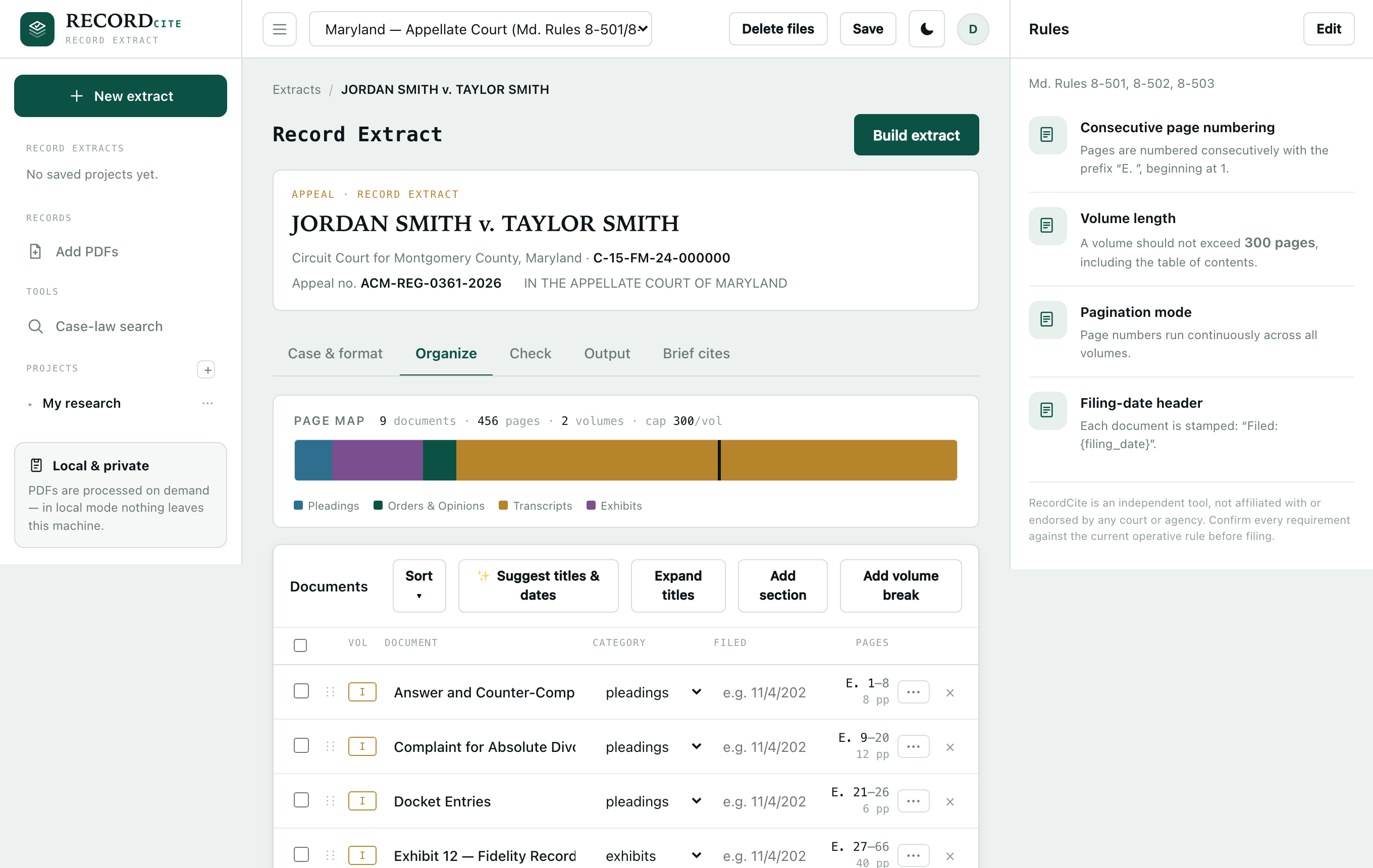
A proportional page map spans the entire extract, segmented by document and colored by category, with volume breaks marked. Drag to reorder and everything downstream updates in real time — no re-stamping, no re-checking citations by hand.

  • Continuous “E.” pagination across every volume, exactly as Maryland requires
  • Volume caps that keep documents intact — or split them when allowed
  • Rotation-correct, proportionally-sized page-number and filing-date stamps
recordcite.com
Page map and document list in the Organize tab.
Maryland rules

Every Maryland formatting rule, handled.

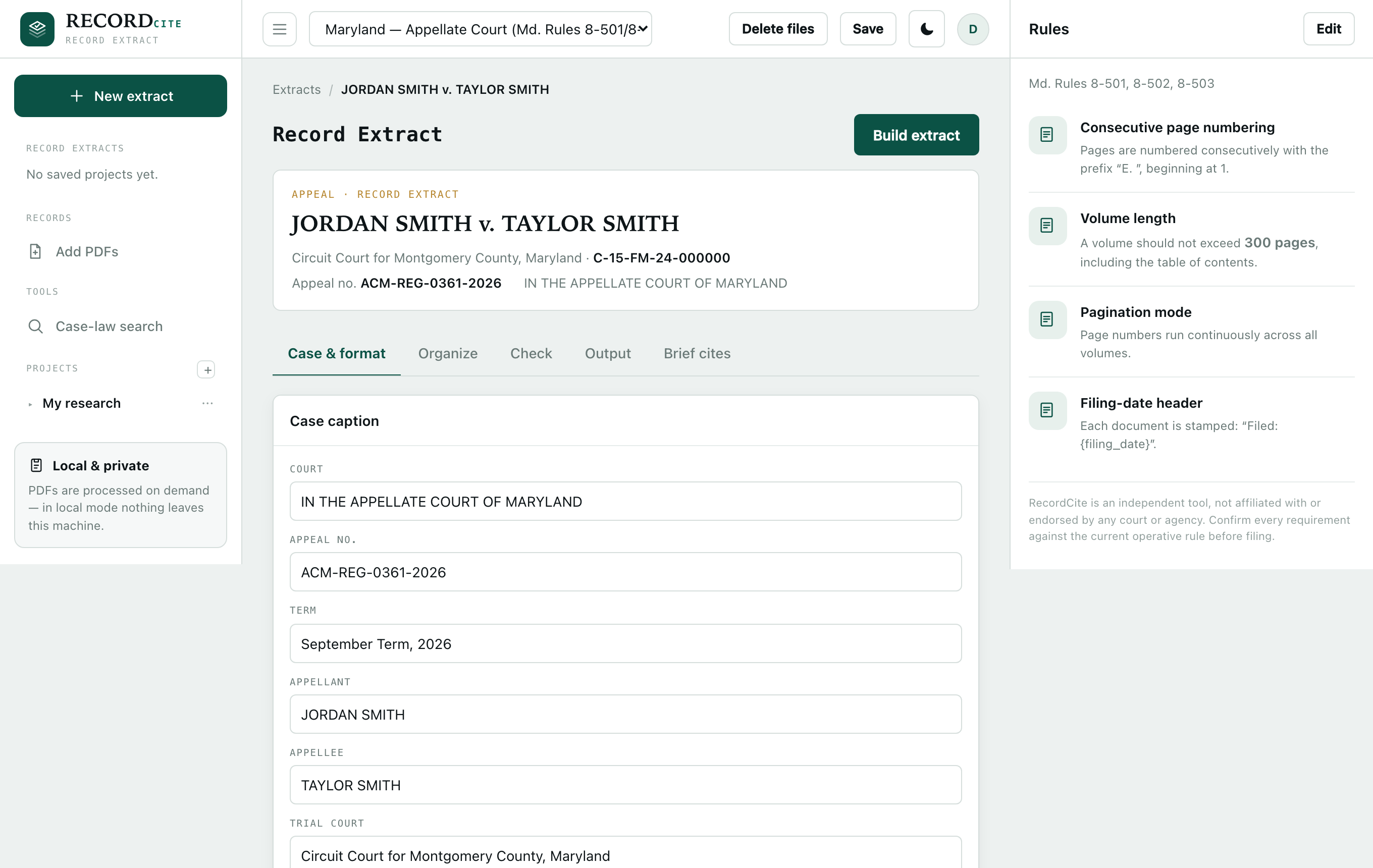
RecordCite builds to Md. Rules 8-501, 8-502, and 8-503 — continuous “E.” pagination across all volumes, the 300-page volume limit, Rule 8-501(i) filing-date headers, and the Rule 8-501(h) table of contents. Every detail is a setting you control, so when a requirement changes you adjust it in seconds.

  • Change numbering, limits, prefix, and header for a single build — the map re-packs live
  • Save your firm's settings as a reusable preset
  • A plain-language compliance checklist, verified against what was actually produced
recordcite.com
Case caption and the live jurisdiction Rules panel.
Front matter

Covers and tables of contents that follow the rule.

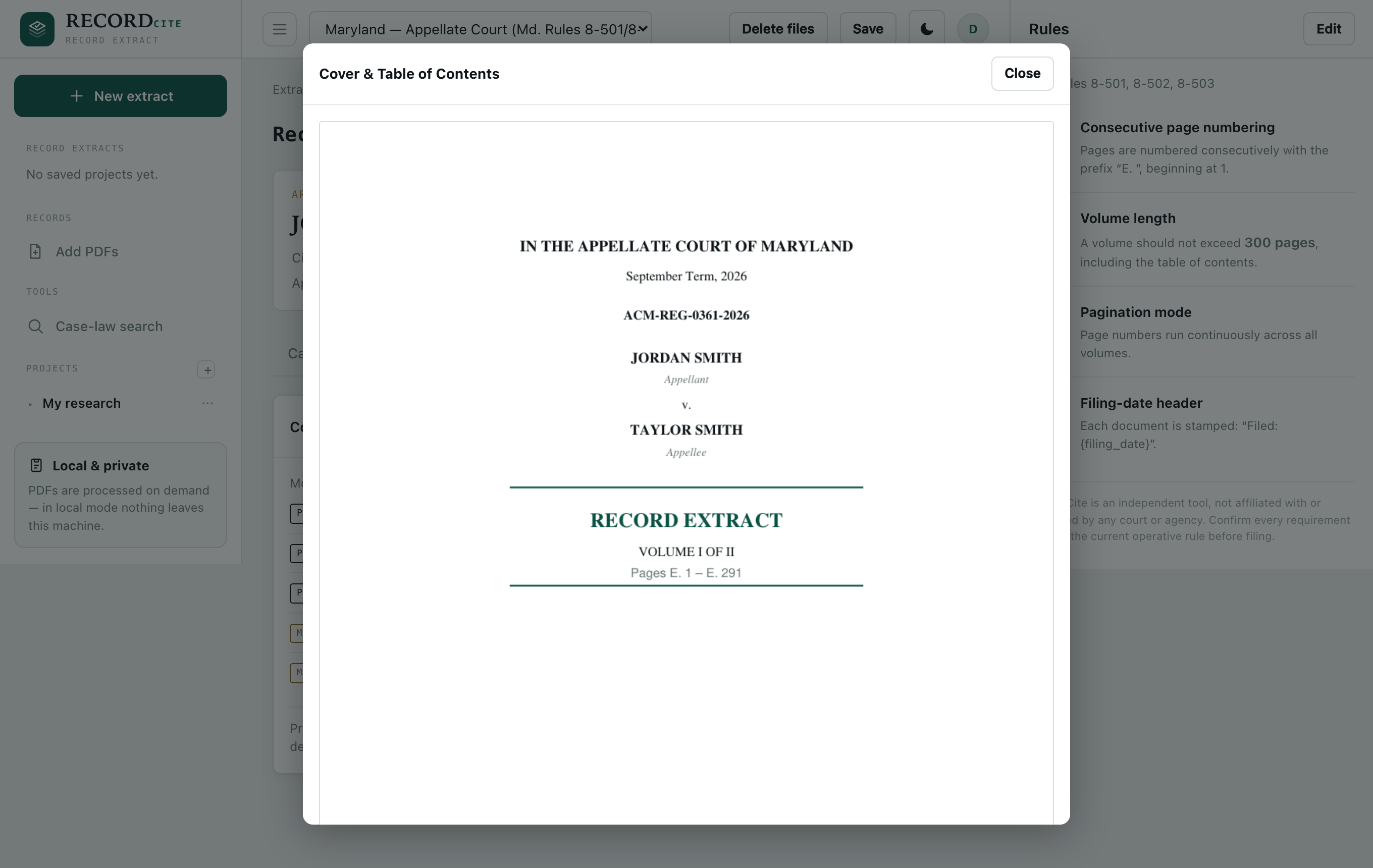
RecordCite generates the cover for each volume and a table of contents to Md. Rule 8-501(h): bold section headings, numbered entries with docket number and filing date, and — for transcripts — indented sub-entries for each witness's direct, cross, and redirect.

  • Witness examinations detected automatically (OCR'd when a transcript is scanned)
  • Every TOC entry is clickable and mirrored in a PDF bookmark outline
  • The full TOC is reproduced in every volume
recordcite.com
Generated cover page preview — Volume I of II, pages E. 1 to E. 229.
Page work

Trim the record, non-destructively.

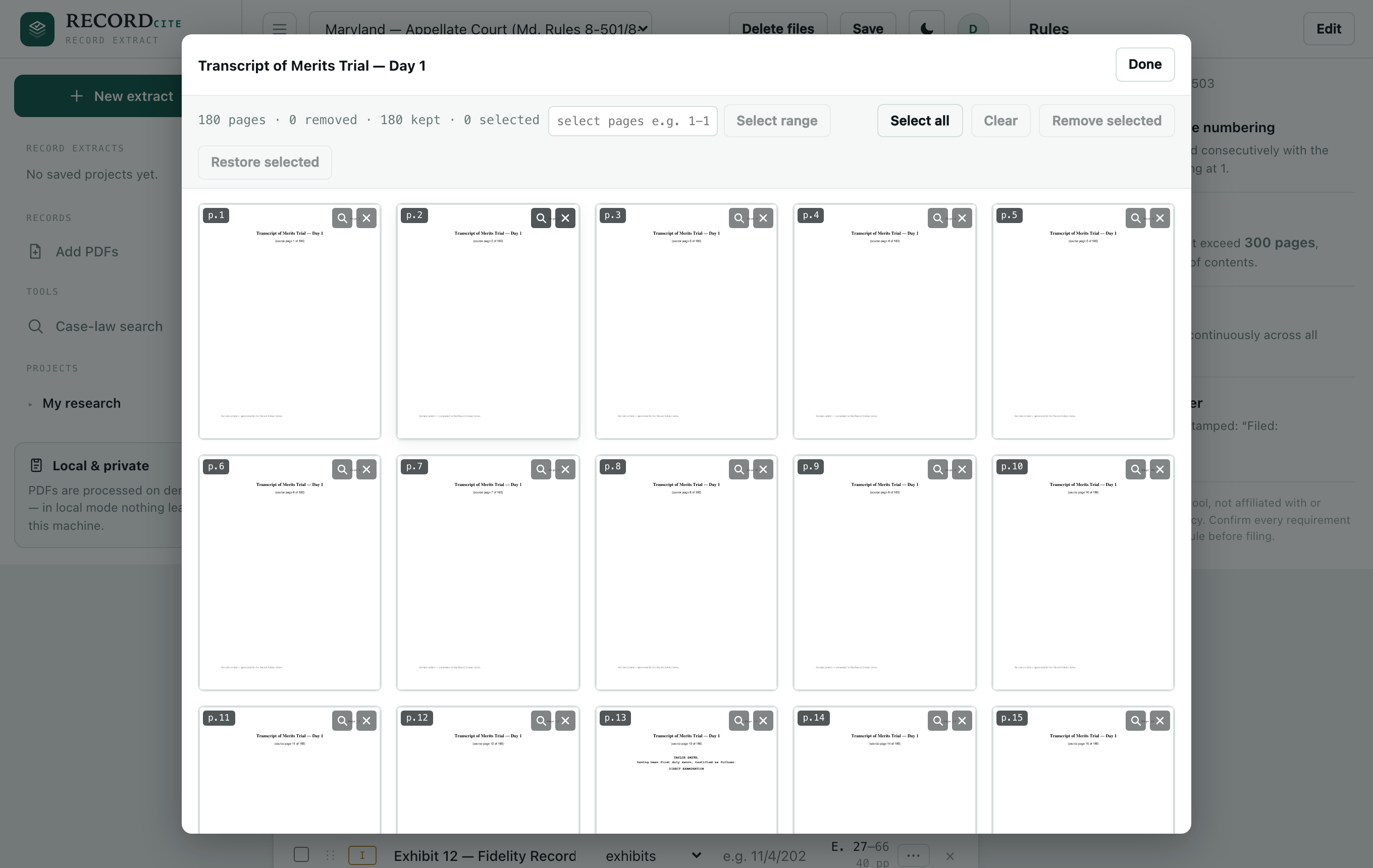
Open any document into a thumbnail grid of every page. Select pages, or type a range like 50-120, 145, and remove them. The numbering closes up automatically — and your source PDFs are never modified.

  • Full-size page view before you decide
  • Bulk range selection across hundreds of pages
  • Removals travel with a saved project and re-apply on reopen
recordcite.com
Page manager — a thumbnail grid of a 180-page transcript with remove and range controls.
Searchable output

Deliver a fully searchable extract.

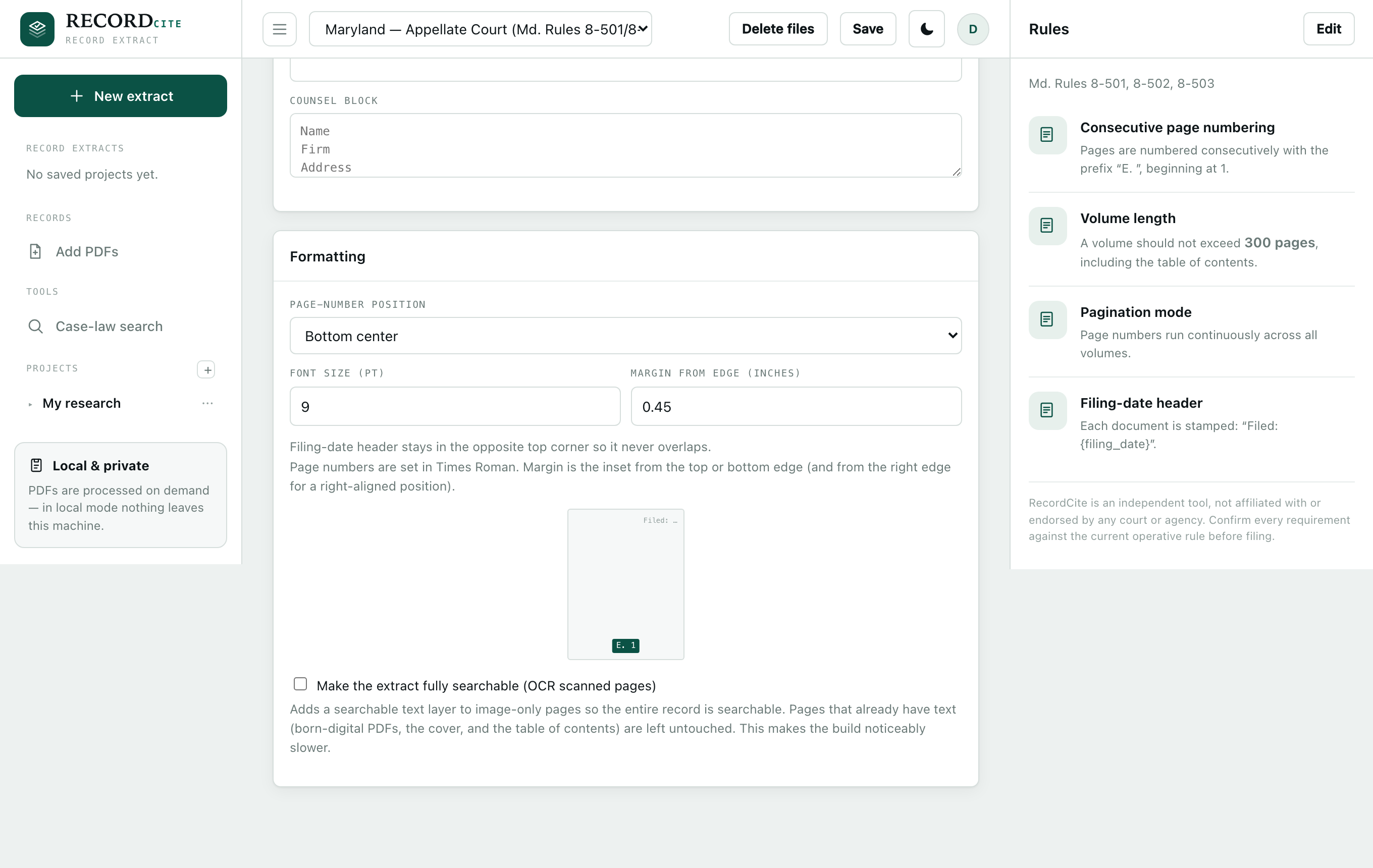
Turn on one toggle and RecordCite adds an invisible text layer to every image-only page, so the whole record is searchable and copy-pasteable. Pages that already have text — born-digital PDFs, the cover, the TOC — are left untouched, and the clickable navigation is preserved.

  • High-accuracy OCR under the hood — nothing to install or configure
  • Page geometry and pagination stay identical
recordcite.com
The Formatting panel with the 'Make the extract fully searchable' OCR toggle.
Brief citer

Every transcript quote and exhibit reference, cited to the record — automatically.

Maryland requires your brief to cite the record extract each time it quotes a transcript or refers to an exhibit. Keep writing the way you already do — “T. 219:1–6”, “Ex. 12”, “DX-19” — then let RecordCite read those references, look up where each one landed in the assembled extract, and supplement it with the exact record-extract page. Your source .docx is never modified; you download a clean, cited copy.

In your brief · before → after
As you wrote it

The court found the transfer was made “to defraud the marital estate.” T. 219:1–6. That finding rests on the Fidelity statements. Ex. 12.

After RecordCite

The court found the transfer was made “to defraud the marital estate.” T. 219:1–6 (E. 221). That finding rests on the Fidelity statements. Ex. 12 (E. 402).

Transcript page 219 maps to the extract page it was assigned during assembly; Exhibit 12 maps to the page where that exhibit begins. RecordCite resolves both from the record you just arranged — not a static list that goes stale the moment you reorder.

Your house cite style · defined once

Firms cite differently. You describe your format with three placeholders, and RecordCite uses it to both recognize the citation in your brief and format the record cite it inserts:

{page} transcript page {num} exhibit / document no. {lines} line range
Transcript T. {page}:{lines} matches T. 219:1–6(E. 221)
Exhibit Ex. {num} matches Ex. 12(E. 402)
House label DX-{num} matches DX-19(E. 50)

Not sure how to write the template? Paste a real cite exactly as it appears in your brief and RecordCite builds it for you, then shows a live tester so you can confirm the match before running.

Control every detail — and miss nothing.

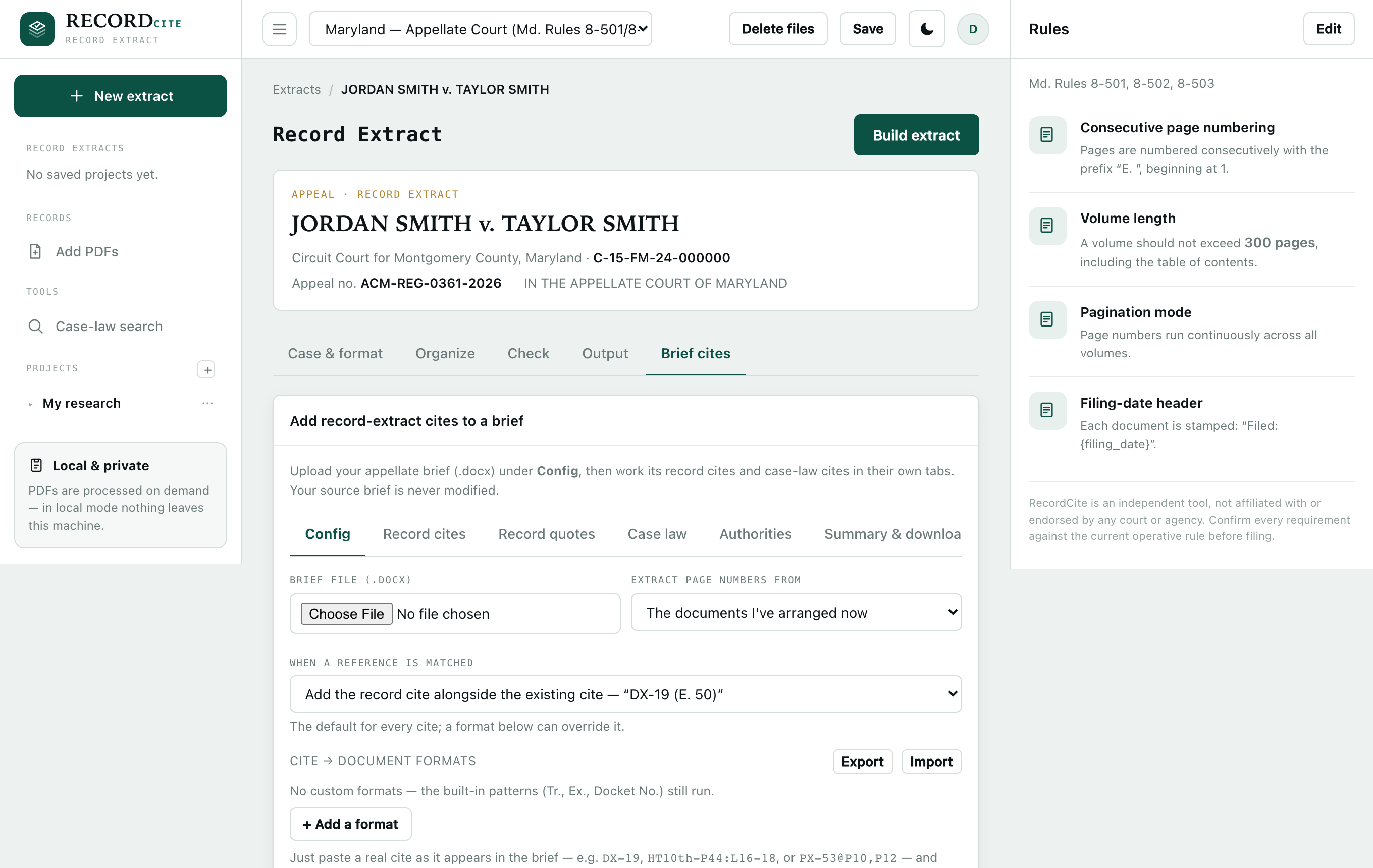
  • Replace or supplement — swap the reference for the record cite, or add (E. 221) alongside what's already there
  • Save & share house formats — a firm's cite styles persist and export to teammates
  • Unmapped-cite report — every reference that couldn't be resolved is listed, so nothing slips through silently
  • Review first — you see every proposed insertion before a single word changes
recordcite.com
The Brief cites tab — upload a .docx, choose replace-or-alongside, and configure house cite formats.
Security & privacy

Built for privileged material.

A record extract is client work product, often sealed. RecordCite is designed so it never becomes a custodian of your documents — and so one firm can never reach another's data.

Metadata only, never the pages

Documents are processed on demand and deleted automatically after a short window — nothing is kept on our servers. Only the extract's structure — the order, tagging, and page ranges — is saved. The pages themselves stay on your machines.

Every firm walled off

Each firm's matters, settings, and files are fully isolated from every other firm's. One client can never see — or reach — another's work.

Encrypted and access-controlled

Passwords and any saved keys are encrypted at rest with industry-standard cryptography, and sign-up can be closed during a private rollout so only people you invite get in.

How it works

Three steps to a filed extract.

STEP 01

Drop your PDFs

Add the record documents and choose Maryland. RecordCite infers each document's category and filing date — every field stays editable inline.

STEP 02

Arrange to the rule

Reorder on the page map, drop in section headings, trim pages, and set descriptors. The volume packing and compliance checklist update as you go.

STEP 03

Build & cite

Generate the paginated volumes with covers, a clickable TOC, and — optionally — a searchable text layer. Then run your brief through the citer.

Why RecordCite

One pipeline, not three tools bolted together.

General‑purpose legal AI drafts and summarizes. Research‑suite add‑ons check whether a case is still good law — if you carry the subscription. Neither assembles your record extract, inserts the record cites, or verifies a transcript quote against the page it sits on. RecordCite does the whole appellate‑specific workflow in one pass.

End‑to‑end, in one pass

Assemble the extract, insert every record cite, and check the case law and quotes — instead of stitching a formatter, a research suite, and manual review together.

No separate research subscription

Case‑law and quote verification run on RecordCite's own Maryland corpus — no third‑party research seat required to confirm a citation or find where a quote comes from.

Privileged by design

Documents are processed transiently and only the extract's structure is stored — not a cloud tool that ingests your entire brief and record.

Our story

Built by someone who needed it to exist.

RecordCite comes from a software engineer who navigated Maryland's appellate process firsthand — and saw up close how much manual, error-prone work goes into assembling a record extract and confirming that every citation and quote actually holds up. It's built in collaboration with practicing appellate attorneys, so the workflow matches how the work really gets done — not how software imagines it.

That firsthand frustration is why RecordCite is uncompromising about the details that decide a filing.

What that conviction builds in

  • A record cite on every quoteTranscript and exhibit quotes are tied back to the extract page — automatically.
  • A pincite that's genuinely in rangeEvery cited page is checked against the opinion, and every quotation against its source.
  • Privileged pages that never leave your handsDocuments are processed transiently; only the extract's structure is ever stored.
Get started

Stop assembling record extracts by hand.

Get in touch and we'll set your firm up. Your documents stay yours — RecordCite keeps only the structure.

Contact

Get in touch.

Questions, a demo, or access for your firm — email [email protected], or send a note and we'll get back to you.